The Stage Between "File Sent" and "Press Running"
Prepress is everything that happens to a file after it's submitted and before ink touches paper. It's largely invisible to the client — when it goes well, you never hear about it — but it's where the majority of print problems get caught, or missed. Understanding the stages helps explain why a "simple" print job sometimes needs a day or two before it hits the press, and what your printer is actually checking for during that time.
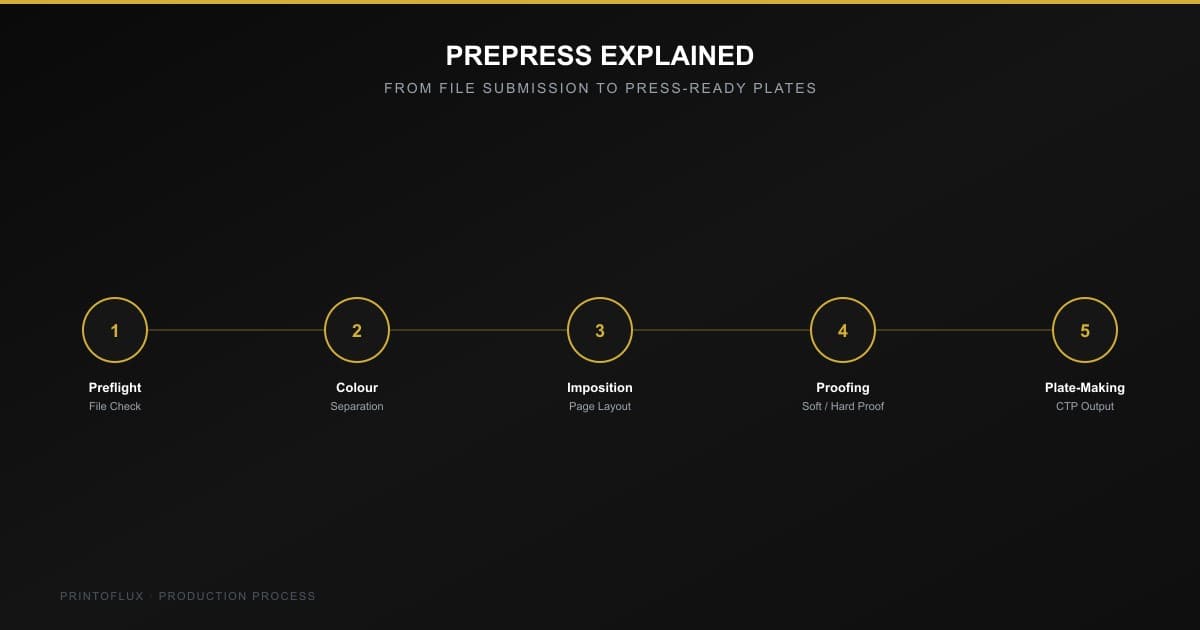
1. Preflight: Checking the File Before Anything Else
Preflight is an automated and manual check of the submitted file against the requirements of the job — resolution, colour mode, bleed, fonts embedded or outlined, image placement, and file structure. This is the same territory covered in our Print-Ready Files 101 guide, but from the printer's side: a preflight check catches a missing bleed or an RGB image before it becomes a production delay, not after plates are already made.
Common preflight catches: low-resolution images that will look pixelated at print size, missing embedded fonts that would substitute a different typeface, spot colours accidentally left in a CMYK file, and live text or logos sitting too close to the trim edge.
2. Colour Separation: Breaking the File Into Printable Layers
Offset printing doesn't print a full-colour image directly — it separates the artwork into individual colour layers (Cyan, Magenta, Yellow, Black for standard CMYK jobs, plus any spot/Pantone colours) that get applied one at a time on press. Colour separation software calculates exactly how much of each ink layer is needed at every point in the image to reproduce the intended colour when they overlap. A file with an unusual colour profile or an unconverted spot colour can throw this process off, which is exactly what preflight is meant to catch beforehand.
3. Imposition: Arranging Pages for the Press Sheet
Pages are never printed in reading order. Imposition software arranges multiple pages onto a single large press sheet in a specific, calculated layout so that after printing, folding, and cutting, the pages land back in the correct sequence — a 16-page booklet section might be arranged as four sheets with pages in an order that looks completely scrambled until it's folded. Imposition also determines how efficiently a job uses the sheet, which directly affects paper cost and waste; a page count or trim size that doesn't impose cleanly (see our guide to book trim sizes) can mean more paper waste per unit, which is why these decisions are best made before files are finalised, not discovered at this stage.
4. Proofing: Catching Problems Before Plates Are Made
A proof is a preview of the final printed result, checked before committing to plates and a full production run. Digital soft proofs (viewed on a colour-calibrated screen) are fast and common for straightforward jobs, while a hard proof (an actual printed sample, sometimes on a proofing press or a high-end digital printer calibrated to match the production press) is used for colour-critical jobs — brand-specific Pantone matching, packaging with exact spot colours, or any job where "close enough" isn't acceptable. This is the last practical point to catch a colour or layout issue before it becomes a full press run.
5. Plate-Making: Turning the File Into a Physical Printing Surface
For offset printing, each colour separation is burned onto its own aluminium plate using a CTP (Computer-to-Plate) system — a laser exposes the plate directly from the digital file, without the film-based intermediate step older workflows required. Each plate carries the image for exactly one ink colour and gets mounted onto its own cylinder on the press. A standard 4-colour job needs four plates (CMYK); a job with spot colours or foil needs one plate per additional colour or finish, which is part of why more colours means more setup cost on offset presses specifically — see our comparison of offset vs digital printing for when that trade-off matters and when it doesn't.
Why Understanding This Helps as a Buyer
None of these stages require the client to do anything differently — a printer handles preflight, separation, imposition, and plate-making internally. But knowing they exist explains two things buyers often ask about: why a same-day "quick fix" to artwork sometimes isn't actually quick once a job has already moved into imposition, and why colour-critical jobs are quoted with a hard-proof step and buyers on tighter budgets can reasonably skip it for less colour-sensitive work.
Getting artwork prepress-ready the first time is the single biggest lever a client has over turnaround time. Request a quote with your files, or check our print-ready files checklist before you submit, and our prepress team will flag anything that needs attention before it costs you a day in production.